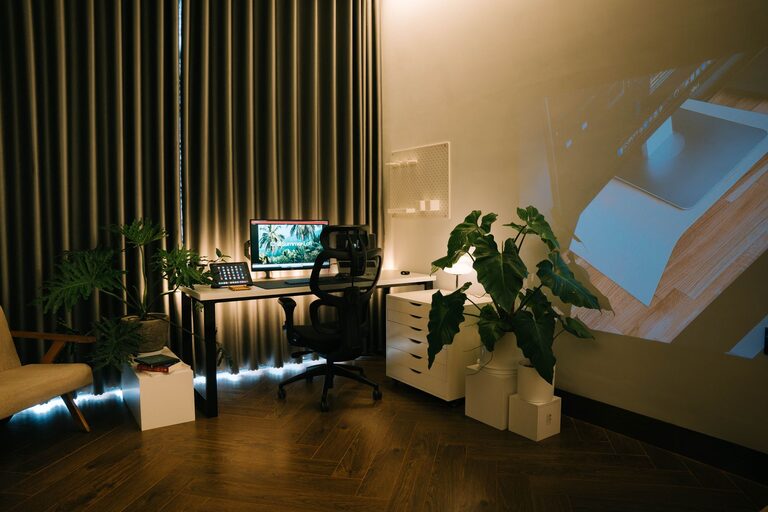

Creating a productive home office space is essential in today’s work environment. Whether you’re working remotely full-time or occasionally, having a dedicated area designed for focus and efficiency can make a big difference in your daily routine. In this post, we’ll explore practical tips to help you set up a home office that supports your productivity and well-being.
Why a Productive Home Office Matters
Working from home can offer flexibility and comfort, but it also comes with distractions and challenges. A well-organized, thoughtfully arranged workspace encourages better concentration, helps separate work from home life, and can even improve your mood. Let’s dive into how to create a space that works for you.
1. Choose the Right Location
Finding the best spot in your home for an office is the first step.
– Quiet and low-traffic area: Pick a room or corner away from household noise and distractions.
– Natural light access: If possible, choose a space near a window to benefit from natural light, which can enhance energy and reduce eye strain.
– Adequate space: Ensure you have enough room for your desk, chair, and any equipment you need without feeling cramped.
2. Invest in Comfortable and Functional Furniture
Comfort is key to staying productive over long periods.
– Ergonomic chair: Select a chair that supports your back and encourages good posture.
– Desk size: Use a desk that comfortably fits your computer, accessories, and any paperwork. Adjustable desks that allow you to alternate between sitting and standing are a bonus.
– Organizational tools: Add shelves, drawers, or filing cabinets to keep essential items within reach but out of the way.
3. Organize Your Workspace Efficiently
A clutter-free environment helps maintain focus and reduces stress.
– Declutter regularly: Remove non-work-related items and keep only what you need.
– Use cable management: Tidy up wires and cords with clips or sleeves to prevent tangling.
– Contain supplies: Use desk organizers, pen holders, and trays to keep stationery and gadgets neatly arranged.
4. Optimize Lighting
Proper lighting reduces eye strain and sets the right mood for work.
– Combine natural and artificial light: Pair daylight with adjustable desk lamps or overhead lights.
– Avoid glare: Position your screen perpendicular to windows and light sources to minimize reflections.
– Use warm and cool light: Use warmer light toward the evening and cooler light for daytime tasks that require alertness.
5. Personalize Your Space Tastefully
Adding personal touches can make your office inviting without becoming distracting.
– Incorporate plants: Small indoor plants boost air quality and add a calming natural element.
– Use artwork or inspiring items: Hang a few pictures or place motivational quotes to keep you energized.
– Choose soothing colors: Soft, neutral tones or colors you find calming help maintain focus.
6. Minimize Distractions
Creating boundaries between work and home life helps your concentration.
– Set clear work hours: Communicate your schedule with family or roommates.
– Use noise-canceling headphones: These can help block out background sounds.
– Turn off notifications: Limit phone or social media interruptions during work periods.
7. Keep Technology Up to Date
Reliable equipment reduces frustration and helps you stay efficient.
– Fast internet connection: Ensure your Wi-Fi or wired connection supports video calls and downloading.
– Quality peripherals: A good keyboard, mouse, and monitor can enhance comfort and productivity.
– Backup power source: Consider an uninterruptible power supply (UPS) for critical devices during outages.
8. Incorporate Break Spots and Movement
Taking breaks keeps your mind fresh and reduces fatigue.
– Create a designated break area: A cozy chair or a small spot away from your desk encourages stepping away regularly.
– Include movement: Stretch, walk around, or do light exercises to stay refreshed.
– Use reminders: Set timers or apps to remind you to take short breaks throughout the day.
9. Plan for Storage and Paperwork
Managing documents and supplies efficiently saves time and space.
– Use vertical storage: Shelves and wall organizers maximize space.
– Label everything: Clear labels on boxes and folders make finding items faster.
– Go digital when possible: Scan important documents to reduce physical clutter.
Conclusion
Designing a home office that fosters productivity is a personalized process. By carefully considering location, comfort, organization, lighting, technology, and work habits, you can create a space that supports your best work. Experiment with these tips and adjust them to fit your lifestyle and preferences. A well-designed home office isn’t just about work; it’s about creating an environment where you feel motivated and comfortable every day.